
Case study · Commercial insurance brokerage
The broker who never goes home
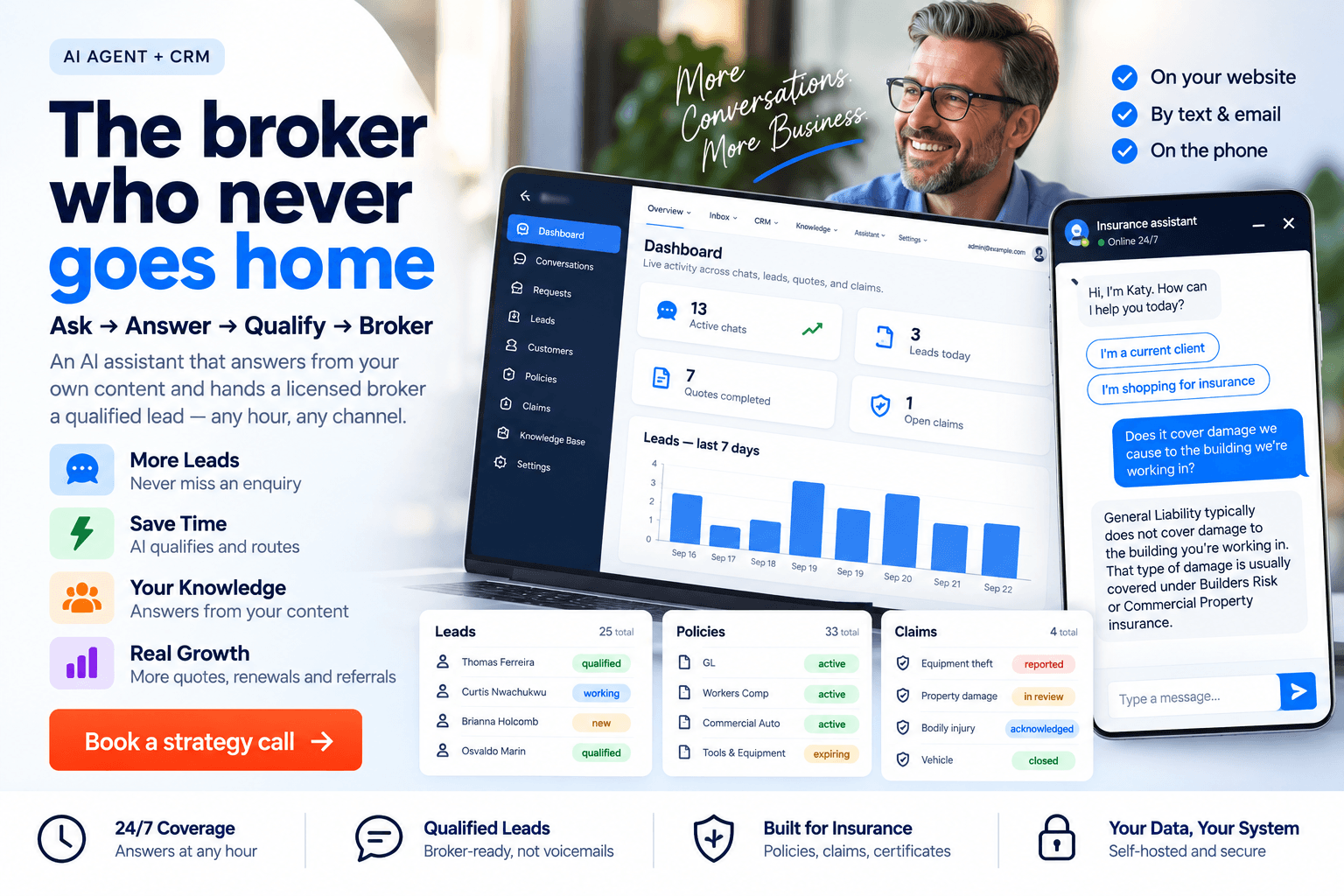
An AI agent and CRM built for Pascal Burke Insurance Brokerage, an independent commercial broker in Las Vegas whose niche is the artisan contractor. The assistant answers from the firm's own material across web chat, SMS, voice and email, asks the questions a submission needs, and hands a licensed broker a qualified lead.
- Client
- Pascal Burke Insurance Brokerage, Las Vegas
- Built for
- Artisan and specialty trade contractors
- Delivery
- Self-hosted - single tenant - owned outright
What the brokerage gets
The enquiry that used to arrive at nine at night and go nowhere is now answered, qualified and recorded. The broker starts Monday with work in a queue instead of a list of missed calls.
Answered
The after-hours enquiry
Nine at night, a weekend, a holiday: it gets a real answer and becomes a scored lead.
Four
Channels, one assistant
Web chat, SMS, voice and email, with one record of the conversation however it started.
Handled
The concierge work
Certificates, claim intake, billing, policy changes and renewals arrive as typed records.
Monday
A queue, not missed calls
The broker opens qualified work rather than a voicemail list.
And the brokerage owns it
One deployment on the firm's own server: its own database, its own encryption key, its own domain and its own content. There is no per-seat licence, so the tenth staff account costs what the first did.
The AI vendor is a dropdown rather than a dependency, and the daily spend limit is a dollar figure the owner types in.
What it is, and the brokerage it serves
A commercial insurance CRM with an AI assistant on the front of it, built for an independent brokerage that shops multiple carriers rather than representing one.
Pascal Burke Insurance Brokerage is an independent commercial broker in Las Vegas whose niche is the artisan contractor, placing everything from general liability and workers compensation to builders risk and contractor bonds.
Who it serves
Their own site runs to 135 pages with ISO descriptions and class numbering behind roughly sixty-five artisan categories. That writing is what the assistant answers from, in the firm's own words rather than a general model's.
- Client
- Pascal Burke Insurance Brokerage, Las Vegas
- Serves
- Artisan and specialty trade contractors
- Answers from
- 135 pages of the firm's own writing
- Electrical
- Roofing
- Plumbing
- Concrete
- Drywall
- HVAC
- Landscaping
- Welding
Ask, answer, qualify, broker
Four stages sit behind one assistant and nothing is re-keyed between them, so a contractor who abandons the chat halfway still leaves a reachable lead.
Ask
A visitor taps the panel and gets a greeting and two buttons rather than a blank box.
- Current client or shopping
- Web, SMS, voice, email
- Buttons before typing
Answer
Every reply is assembled from the brokerage's own pages, documents and product records.
- Sources recorded per message
- Refuses when nothing matches
- Fetches a broker instead
Qualify
Contact details are written to the CRM the moment they are given, not at the end of a form.
- Partial leads saved
- Scored 0 to 100
- Typed service requests
Broker
One click switches the conversation to human mode and staff type as themselves.
- One-click takeover
- AI summary emailed to staff
- Connect to a broker, always on screen
Where the return actually comes from
Not from replacing a broker. What it replaces is the dead time: the enquiry with nowhere to land, the certificate request that interrupts an underwriter, the renewal nobody opened the list for, and the claim that sat on an answerphone overnight.
The screens that do the work
Seven captures from the running system. Every chat reply in them is live output from the assistant answering against the brokerage's own knowledge base.
Nothing here is blurred, because nothing here is real. Every business, person, policy and figure on screen was invented for this write-up, so there is no client information in any of them to protect. The screens themselves are untouched captures from the working application.
Screen 01: The morning screen
Live chats, handoffs waiting, and the prospects scoring highest at the top of the alerts panel.Active chatsHandoffs waitingHot leads by scoreSeven-day lead trend Screen 02: The whole arc, on one screen
A roofer days from losing cover, the facts a broker will need taken in order, and a request for a person answered with a handoff rather than a dead end.Full transcriptOne-click takeoverStaff reply as themselves Screen 03: Leads, scored and ready to work
Every prospect the assistant captured, scored on contact details, trade, state and buying intent.Scored 0 to 100Trade and stateNine sources trackedPartial records still reachable Screen 04: Everything the assistant is allowed to say
The documents the answers come from, and a bench showing exactly which passages a given question pulls.Staff-editable documentsLive within secondsRelevance score per passage Screen 05: The AI bill has a ceiling the owner sets
A hard daily dollar cap the owner sets, with today's spend counted against it per vendor.Three vendors, one dropdownKeys encrypted, shown as a hintTest connection makes a real call Screen 06: What they actually asked for
Each request becomes its own record, with what has been collected, what is still missing and how urgent it is.Quote, certificate, claimBilling, policy change, callbackLosses marked urgent automatically Screen 07: What the visitor sees
One line of script puts the panel on any page, and Connect to a real broker stays on screen throughout.One-line embedShadow DOM isolationButtons before typing
Behind these sit the policy, claim, certificate and renewal registers, the declination log, the conversation designer and the live health page.
Everything the system does
150Delivered
150 delivered capabilities, grouped by the part of the brokerage each one serves.
Showing 150 of 150 delivered capabilities.
Visitor chat experience13
- One-line website embed
- Shadow DOM style isolation
- Zero-dependency 11 KB widget
- Per-site colour and persona
- Tap-to-answer quick replies
- Button-first entry menu
- Mobile-responsive chat panel
- Labelled, keyboard-operable controls
- Conversation resumes after reload
- Known-customer recognition
- Grounded answers with recorded sources
- Suggested next action per reply
- End-of-chat star rating
Lead capture15
- Progressive in-chat capture
- Partial leads saved instantly
- Fallback contact form
- TCPA consent capture
- Lead scoring, 0 to 100
- Hot-lead alert on crossing
- Lead status pipeline
- Lead assignment to brokers
- Lead activity timeline
- Note and call logging
- E&O declination logging
- Nine lead sources tracked
- Typed service-request queues
- Missing-information tracking
- Automatic urgency on losses
Handoff & live chat10
- Cross-channel conversation inbox
- Full transcript viewer
- Per-message intent and confidence
- Retrieved-source count per reply
- One-click human takeover
- Staff replies into the widget
- AI summary emailed to staff
- Availability-aware handoff wording
- Five-minute unattended release
- Duplicate-proof message polling
Multi-channel reach14
- Two-way SMS conversations
- Automatic STOP and HELP handling
- Consent-gated outbound texting
- AI voice receptionist
- Speech-driven call routing
- Caller recognition by number
- Warm transfer to staff
- Department-based call routing
- Voicemail capture with alerts
- Call logs with transcripts
- Take-a-message records
- Inbound email auto-reply
- Numbered menus over text
- Unified communications log
AI engine & controls15
- Three interchangeable AI vendors
- Vendor switching from settings
- Encrypted keys held in the database
- Write-only masked key entry
- One-click connection test
- Automatic cross-vendor failover
- Per-vendor model selection
- Temperature and token tuning
- Editable token price rates
- Daily dollar spend cap
- Live per-vendor spend meter
- Answer caching for repeats
- Contact form fallback at the cap
- Prompt-injection input sanitising
- Off-topic refusal guardrails
Knowledge & training16
- Website crawl to knowledge
- Website-to-CRM product extraction
- FAQ and glossary extraction
- Bulk folder document ingest
- In-app knowledge authoring
- Instant chunking and embedding
- Malware-scanned knowledge upload
- Local no-cost embeddings
- Relevance floor before answering
- Live semantic search bench
- Follow-up question rewriting
- Staff-editable intent library
- Staff-editable training examples
- One-click classifier retraining
- Utterance classification tester
- Intent label on every message
CRM & book of business15
- Thirty-seven managed record types
- Generated list and edit screens
- Full-text search per collection
- Soft delete with recovery
- Customer and client records
- Policy register with expirations
- Quote register with carrier options
- Applications and endorsements
- Claims register with status
- Certificate register
- Cancellations and win-back
- Billing enquiry tracking
- Appointments and callbacks
- Loss run requests
- Visitor feedback records
Documents & payments13
- Certificate PDF generation
- In-process PDF rendering
- Self-hosted e-signature envelopes †
- ESIGN and UETA consent capture †
- Tokenised single-use signing links †
- Signature audit trail †
- Record-only payment intents
- Gateway-ready payment webhook
- Local or S3 file storage
- Signed expiring download links
- CSV contact database import
- Non-destructive import preview
- Duplicate match and merge
Automation & follow-up8
- Background job queue
- Nightly renewal scan
- Renewal work items 60 days out
- Cancellation follow-up dating
- Source-specific nurture sequences
- Queued staff notifications
- Queued email and SMS sending
- Restart-safe repeatable jobs
Console & setup13
- Live KPI dashboard
- Seven-day lead trend chart
- Alerts and hot-lead feed
- No-code persona and greeting
- Visual button-menu builder
- In-admin chat sandbox
- Widget install snippet generator
- Per-site widget keys
- Company profile editor
- Carrier, vendor and department tables
- Feedback and ratings review
- Permission-aware navigation
- Seventeen live health checks
Security & operations18
- Staff sign-in with roles
- Role-based permission model
- Permissions enforced server-side
- Login brute-force throttling
- Eight-hour staff sessions
- Encrypted customer PII
- Searchable encrypted contact fields
- Client portal passcode flow †
- Virus-scanned file uploads
- Fail-closed malware rejection
- Widget origin allowlist
- Chat session ownership tokens
- Per-IP limits and daily quotas
- Immutable audit trail
- Insecure-production boot refusal
- Single-tenant deployment isolation
- Single-server self-hosted install
- Health endpoint for monitoring
† Five capabilities are built and tested but are reached today through the API rather than a button in the console: the e-signature envelopes, the ESIGN and UETA consent record, the single-use signing links, the signature audit trail and the client portal passcode flow.
What it runs on
Next.js 14 in TypeScript, running as two processes from one codebase: the console people use, and a background worker for the scheduled jobs.
- Next.js 14
- TypeScript
- MongoDB
- Redis
- ClamAV
- Ubuntu, systemd, Nginx
- No Docker, no cloud account
- Single tenant, self-hosted
- Search costs nothing per query.
- Retrieval and intent labelling run on a local model, so reading the knowledge base makes no vendor call at all.
- Every hosted call passes one metered choke point.
- No future feature can quietly spend past the day's cap, and a misconfigured production server refuses to boot.
The two lines that are never crossed
The assistant never binds coverage and never quotes a final premium. Both limits were drawn in the brief and are enforced in the software rather than requested in a prompt.
It refuses rather than improvises
The relevance floor was measured against the real knowledge base and raised until anything off topic is refused and routed to a broker. A chat that improvises on coverage is not a helpful chat, it is an uninsured opinion published under the firm's name.
Declined recommendations are timestamped
The lead record carries a dedicated declination log that timestamps every coverage offered and refused, beside a full activity timeline and an audit trail of every staff change. That is the errors-and-omissions evidence a carrier actually asks to see.
It says so when it cannot help
At the spend cap, during a provider outage, or when no broker is free, it falls back to a short contact form or a stated follow-up. Promising a connection the system will not make costs more goodwill than admitting the queue is busy.
The problems independent brokerages keep running into
Each row is a documented failure mode in independent broking, and what the system does about it.
- The problemEnquiries after five and at weekends have nowhere to land, and a contractor comparing three brokers rarely rings back the one that did not answer.
- Resolved byAnswered at any hour on web, text, email and phone, qualified, and recorded as a scored lead before the office opens.
- The problemLong quote forms are abandoned, and the firm never learns who the contractor was.
- Resolved byAnswers are written to the CRM as they arrive, so an abandoned chat still leaves a reachable lead.
- The problemCertificate requests and renewals are relentless, low value and urgent, and they interrupt the people who can least afford it.
- Resolved byCertificates are taken in chat as typed records, and a nightly scan opens a renewal item sixty days before expiry.
- The problemA client declines a coverage, has a loss two years later, and remembers the conversation differently.
- Resolved byA declination log timestamps every coverage offered and refused, beside a full activity timeline.
- The problemTexting clients is effective and legally hazardous. One message to somebody who replied STOP is expensive.
- Resolved byConsent is a ledger. STOP, HELP and START are honoured inside the sending job, so no code path can bypass the check.
Owning it against renting it
Commercial chat and agency platforms are priced per seat, per month, for as long as you use them. This is one deployment the brokerage owns, so growth is free at the licence line.
| Renting a platform | Owning this one |
|---|---|
| Per seat, per month. Every hire raises the bill whether or not the software does more. | One deployment on one modest server. Adding a staff account costs nothing. |
| Their model, their price changes, their roadmap. | Three model vendors behind one dropdown, your own keys, and a daily cap you set. |
| Your conversations, contacts and consent records sit in their database, on their retention terms. | Your database, your encryption key, your backups. One command restores the lot. |
| Changing a menu, a greeting or an answer means a support ticket. | Staff edit it in the admin panel and the change is live in seconds. |
Every correction staff make is live within seconds, so the answers improve as a by-product of ordinary work.
What it is worth at the point of sale
A brokerage is usually sold as a book of business. One sold with a working operating system attached is a different conversation: the buyer acquires the intake, the qualification and a documented history of who changed what.
What the outcome depends on
None of this pays for itself unless somebody works the queue. A hot lead left three days is worth about what a missed call was worth.
Build one for your business
This was built from one brokerage's own website, trades and contact book. We build the same class of assistant for brokerages, practices, distributors and service businesses.
We start from what you already have.
Your website, your documents, your contact spreadsheet, not a generic template.
You get a working phase early.
The first delivery is a complete workflow you can put in front of customers.
You own the result.
The source code, the database and the data are yours, hosted where you choose.
It keeps growing with you.
New requirements become the next phase, built on the same foundation.
Two questions worth answering first
- What happens to an enquiry that arrives at nine on a Sunday?
- If the honest answer is nothing until Monday, that is the number to size the build against.
- If your AI vendor doubled its price tomorrow, what would you do?
- If the answer is pay it, you are renting something you should own.
Send us the website you run on today and we will tell you plainly what it would take to put an assistant in front of it.
Related: the estimating and job costing system we built for a US contractor, our AI automation practice, and how we run security and data handling. See the rest of our portfolio or read what clients say.
Questions brokers ask before commissioning one
Can the assistant bind coverage or quote a premium?
No. Both limits were drawn in the brief and are enforced in the software, and a licensed broker is one tap away at every step.
What happens when the assistant does not know the answer?
It says so and fetches a broker. An answer is only written when the retrieved material clears a relevance floor, and the passages used are recorded against the message.
Which channels does one assistant cover?
Four: web chat, SMS, voice and email. One assistant answers all of them, and the conversation is one record however it started.
Who changes the wording, the buttons and the knowledge base?
Staff, in the admin panel. Persona, greeting, buttons, knowledge base and FAQ are editable with no developer and no deployment.
How is the AI bill kept under control?
Search and intent labelling run on the brokerage's own server at no per-query cost, and every hosted model call is metered against a daily cap the owner sets. At the cap the contact form keeps converting visitors rather than the site going quiet.
Do we own the software and the data?
Yes. Source code, database, encryption key and hosting are the client's, single tenant, with no per-seat licence.
Send us the enquiry you lost last weekend
Tell us how enquiries reach you today and what happens to them after five. We will tell you plainly what it would take to answer them, and what we would not build.
What happens next
- You show us where enquiries arrive and where they stop.
- We scope a first phase you can run the brokerage on.
- You decide, owning whatever we build.